
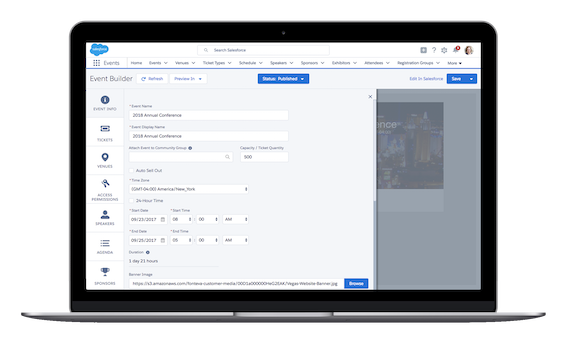
Manage Any Type of Event, In-Person or Virtual
- Supports In-Person, Virtual, and Hybrid Events, Free or Paid
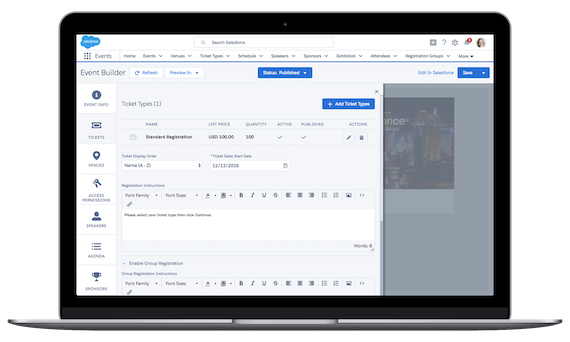
- Configurable Registration
- Manage Speakers, Sponsors, & More
Native to Salesforce
- 100% Native to Salesforce
- No Integration necessary
- Access All Customer Demographics
- Comprehensive Reports
- Drag-and-Drop Dashboards

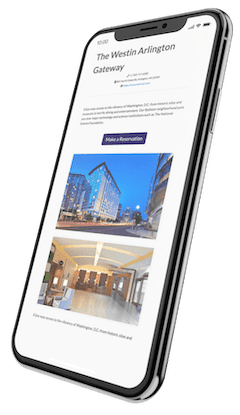
Fonteva Mobile Events App
- Extend the user experience of your events
- Stay connected to your attendees with real time updates and push notifications
- Maintain branding and themes in your app
Predictable Pricing

Software as a Service (SaaS) Model
One predictable fee per organization per year.

Webinar Sync
Connect your registration in Fonteva Events to popular virtual meeting platforms such as Zoom®

One-Time Implementation Cost
We set up your software and train your staff to take ownership of their solution.

Upgrades Included
Fonteva and Salesforce release multiple, feature-rich software upgrades throughout the year.


Popular Features

Event Lifecycle Management

Agenda Builder

Responsive Event Microsites

Attendee Management

Advanced Registration

Simple & Conference Events

eStore & Transaction Processing

Reports & Dashboards
Association Event Management Software FAQs
What does data migration look like when switching to a new Salesforce-based event platform?
The data migration process will vary depending on your legacy platform and existing tech stack. However, it usually starts with a deep audit and cleanup of your legacy data, focusing on duplicate entries, outdated records, and inconsistent formatting.
If you are migrating to Salesforce for the first time, you must also map your legacy data to the new Salesforce architecture. This typically includes:
- Importing historical event attendance records to maintain accurate member data.
- Mapping existing financial data to ensure revenue reporting remains unbroken.
- Testing to ensure data flows correctly before the system goes live.
If your other solutions, such as your AMS, are not Salesforce native, you may also need to set up integrations to prevent data silos.
Can we customize the look of our event microsites and portals?
Fonteva allows you to fully customize your event microsite and registration portal to reflect your branding. The platform offers drag-and-drop builders and out-of-the-box templates, so you can tailor the site’s look without extensive coding experience. This way, you can fully white-label the attendee experience for a seamless transition from your main website to the event portal.
How does AI enable personalization?
With help from AI tools, event software can use machine learning algorithms to analyze an attendee's past event history, CRM profile, and community interactions to automatically provide tailored recommendations. AI enables the solution to suggest a dynamic, personalized itinerary for each attendee rather than requiring them to sift through event resources on their own. For example, the tool might recommend the most relevant breakout sessions, exhibitors, and networking connections based on the member’s data.
Does Fonteva's event management software offer AI capabilities?
Yes. Because Fonteva is built on the Salesforce platform, it leverages the power of Salesforce Einstein (now part of Agentforce AI).
This gives your team built-in access to predictive analytics, intelligent recommendations, and automated workflows. And, Salesforce is investing heavily in its AI technologies, enabling your association to easily implement and leverage new tools as they evolve.
Because these AI tools are integrated with your existing technology and database, they function smoothly right out of the box to help you enhance your event strategy. For instance, your association can use them to:
- Forecast attendance: Predict registration numbers or which sessions will be the most popular.
- Score event engagement: Automatically track and score how actively attendees interact with your event.
- Provide "Next Best Actions": Surface intelligent, automated recommendations for your staff—such as prompting them to send a targeted discount code to a wavering registrant.
Does the software support international events?
Yes, Fonteva’s event software is built to handle global audiences. Our registration capabilities, integrated with a payment processing tool, can manage multiple currencies, ensuring attendees see pricing in their local format while the system handles conversions and processing.